
Appearance
Commission Sales Model
Overview
Zal Ultra supports two ways for your resellers to earn:
- Markup (the classic model) — each reseller, sub-reseller and retailer buys a package from the level above and adds its own margin. See Assign Package to Users.
- Commission — every reseller, sub-reseller and retailer sells your package at your price, and earns a percentage of every payment collected instead of a margin.
Both models can run side by side
The sales model is chosen per reseller. One reseller's team can work on Commission while another stays on Markup.
Markup vs Commission at a glance
| Markup (classic) | Commission | |
|---|---|---|
| Who sets the subscriber price | Each seller adds its own margin on top of its parent's price | The admin. Every seller sells at the admin's price |
| Where a retailer gets its package | From its sub-reseller, at the sub-reseller's price | Directly from the admin |
| How sellers earn | The difference between their buying and selling price | A percentage of each payment collected |
| Which packages a seller can sell | The packages assigned to it with a price | The packages ticked Can Sell on its reseller |
The Example Used on This Page
- The admin has a package 10MB. The subscriber price is 700.
- Under the admin: a Reseller → a Sub-reseller → a Retailer → a Subscriber who buys 10MB.
- Example rates (you set your own):
- Retailer selling rate 10%
- Sub-reseller upline rate 8%
- Reseller upline rate 5%
1. Package Flow — Who Sells What
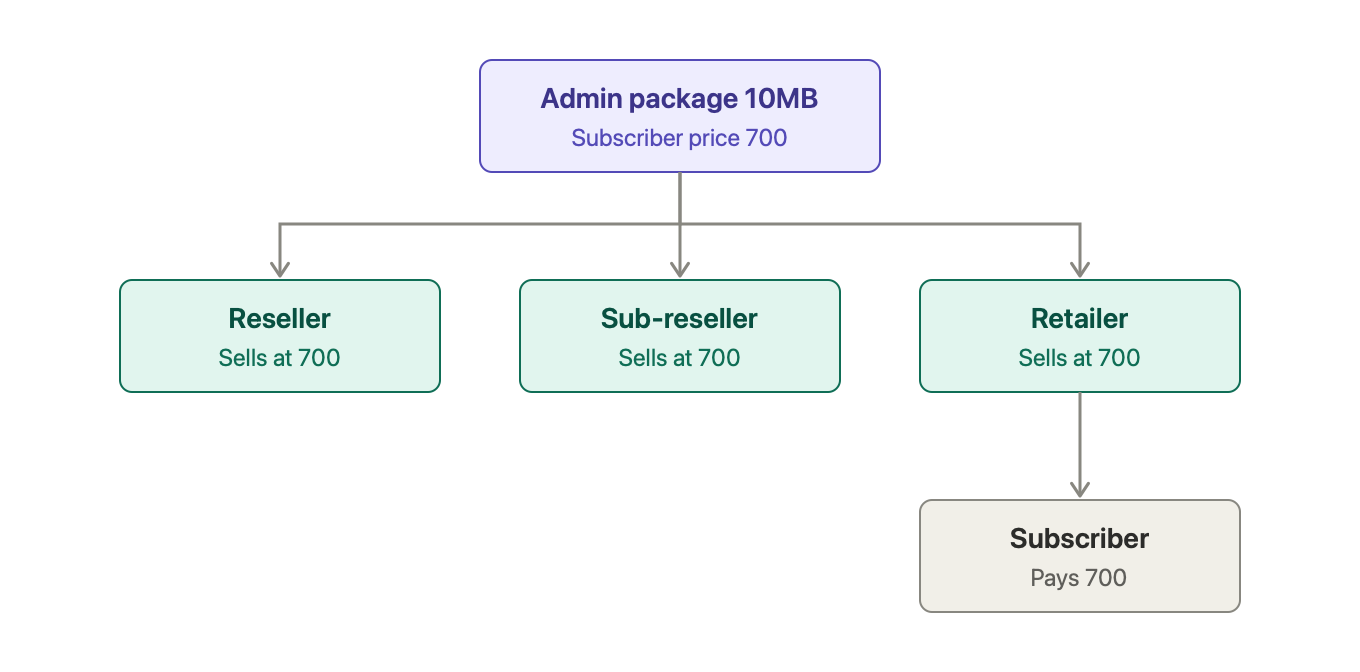
- The retailer does not get the package from the sub-reseller's profile. The reseller, sub-reseller and retailer all sell the admin's 10MB directly, at 700.
- Nobody in the chain can change the price. Only the admin sets it.
- Which packages the team may sell is chosen by the admin on the reseller's Assign Packages page (the Can Sell tick). The reseller's sub-resellers and retailers sell the same packages.
- A package that is not ticked cannot be sold or auto-renewed by anyone in that reseller's team.
2. Money Flow — Where the 700 Goes
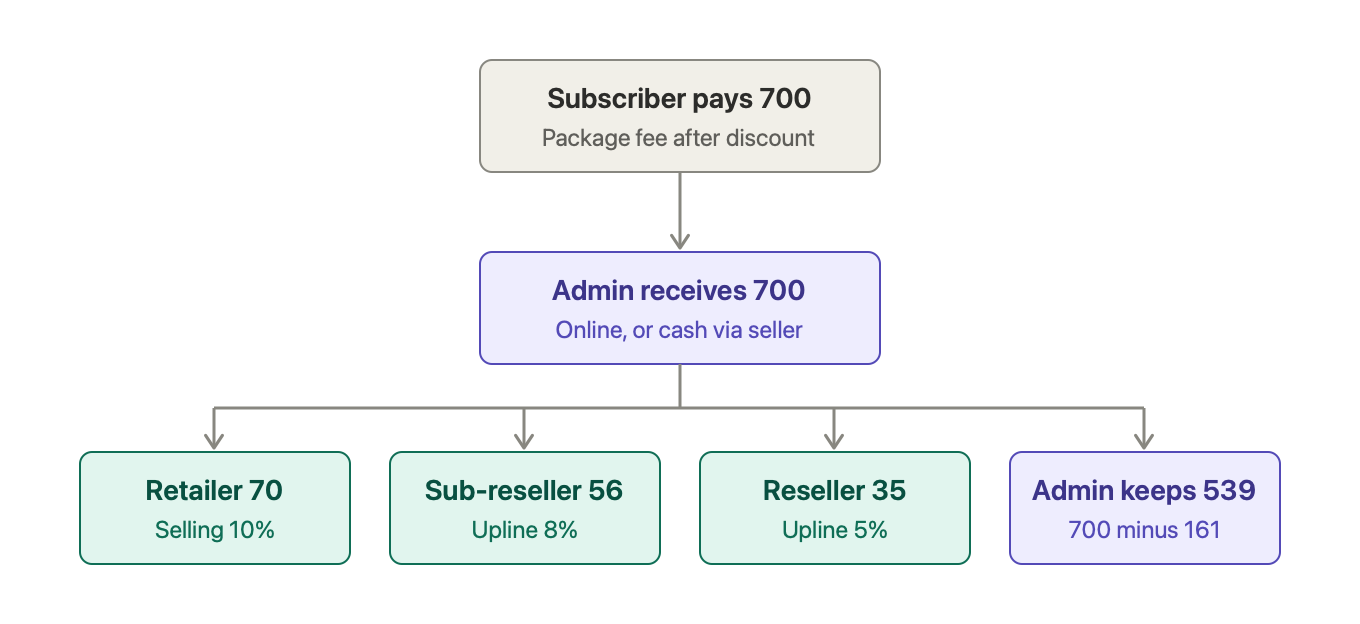
| Who | Rate | Why | Amount |
|---|---|---|---|
| Retailer | Selling 10% | It sold the package | 70 |
| Sub-reseller | Upline 8% | The seller is under it | 56 |
| Reseller | Upline 5% | The seller is under it | 35 |
| Admin keeps | 700 minus 161 commission | 539 |
How Much Does the Admin Earn?
- The admin receives 700, owes 161 in commission and keeps 539.
- If the admin's 10MB is set up as Price 500 + Subscriber Profit 200, the reports show the admin's profit on this sale as 200 before commission and 39 after commission (the Seller Commission and Admin Net Profit columns in the invoice list and exports).
3. Upline Flow — Who Earns on Whose Sales
- The seller earns its selling rate on payments collected from its own subscribers.
- Every Commission user above the seller earns its upline rate on the same payment, up to 3 levels above. It stops at the admin.
| Who sells | Who earns |
|---|---|
| Retailer | Retailer (selling rate), sub-reseller and reseller (their upline rates) |
| Sub-reseller, to its own subscriber | Sub-reseller (selling rate), reseller (upline rate) |
| Reseller, to its own subscriber | Reseller only (selling rate) |
Rates are capped
The rates on one chain can never add up to more than 100%. Zal Ultra refuses to save rates that would.
Rules Worth Knowing
- Commission is earned when money is collected, not when the invoice is made. A due invoice earns nothing until it is paid. A part payment earns commission on the part paid.
- Commission is calculated on the package fee after discount. Extra fees (installation, activation and so on) do not earn commission.
- Online payments go straight to the admin. Cash collected by a seller is recorded as cash the seller holds for the admin.
- Reversed invoices take the commission back.
- Discounts: each seller has a maximum discount it may give, as a percentage of the package price. Larger discounts need an admin.
How to Set It Up (Admin)
- Turn on Commission Sellers in Settings → Software Settings.
- Open the reseller's profile, click Profile Settings, and set Sales Model to Commission. Its sub-resellers and retailers follow it.
- In the same place, set each user's Selling Rate, Upline Rate and Max Discount.
- On the reseller's Assign Packages page, tick the packages the team may sell. You can also set a different rate for a single package there.
- Check the result on the Packages tab of the reseller, sub-reseller or retailer. It shows each package with its price, rates and what the user earns per sale.
Switching never deletes data
Switching a reseller between Markup and Commission keeps its saved markup prices and its commission package list. Both are used again when it is switched back.
Coming next
Paying commission out to sellers (into their balance or in cash). Today, commission is calculated and shown in reports and dashboards; the payout step follows in a later update.