
Appearance
SMS Settings
Overview
SMS Settings allow you to configure automated text message notifications to subscribers. The system can send SMS for various events like activation, expiration reminders, payment confirmations, and custom notifications. Proper SMS configuration ensures your subscribers stay informed about their account status.
📋 Table of Contents
- SMS Gateway Configuration
- Supported SMS Gateways
- SMS Templates
- SMS Notifications
- Testing SMS
- Troubleshooting
SMS Gateway Configuration
Gateway Type
What It Does: Selects which SMS service provider you want to use for sending text messages.
Available Built-in Gateways
ZAL ULTRA comes with 18+ pre-integrated SMS gateways from different countries. Simply select your gateway and enter credentials - no technical setup required!
Bangladesh (BD)
- Bulk SMS (BD) - Requires: api_key, senderid
- Reve SMS (BD) - Requires: apiKey, secretKey, callerID
- 24 Bulk SMS (BD) - Requires: api_key, customer_id
- iSMS Plus (BD) - Requires: api_token, sid
- Novocom SMS (BD) - Requires: ApiKey, ClientId, SenderId
Pakistan (PK)
- Life Time SMS (PK) - Requires: api_token, api_secret, from
- Sendpk (PK) - Requires: password, sender, username
- Whatsapp SUS (PK) - Requires: api_key, sender, footer
- CSMS (PK) - Requires: msisdn, password, mask
- Msg Whatsapp (PK) - Requires: api_key
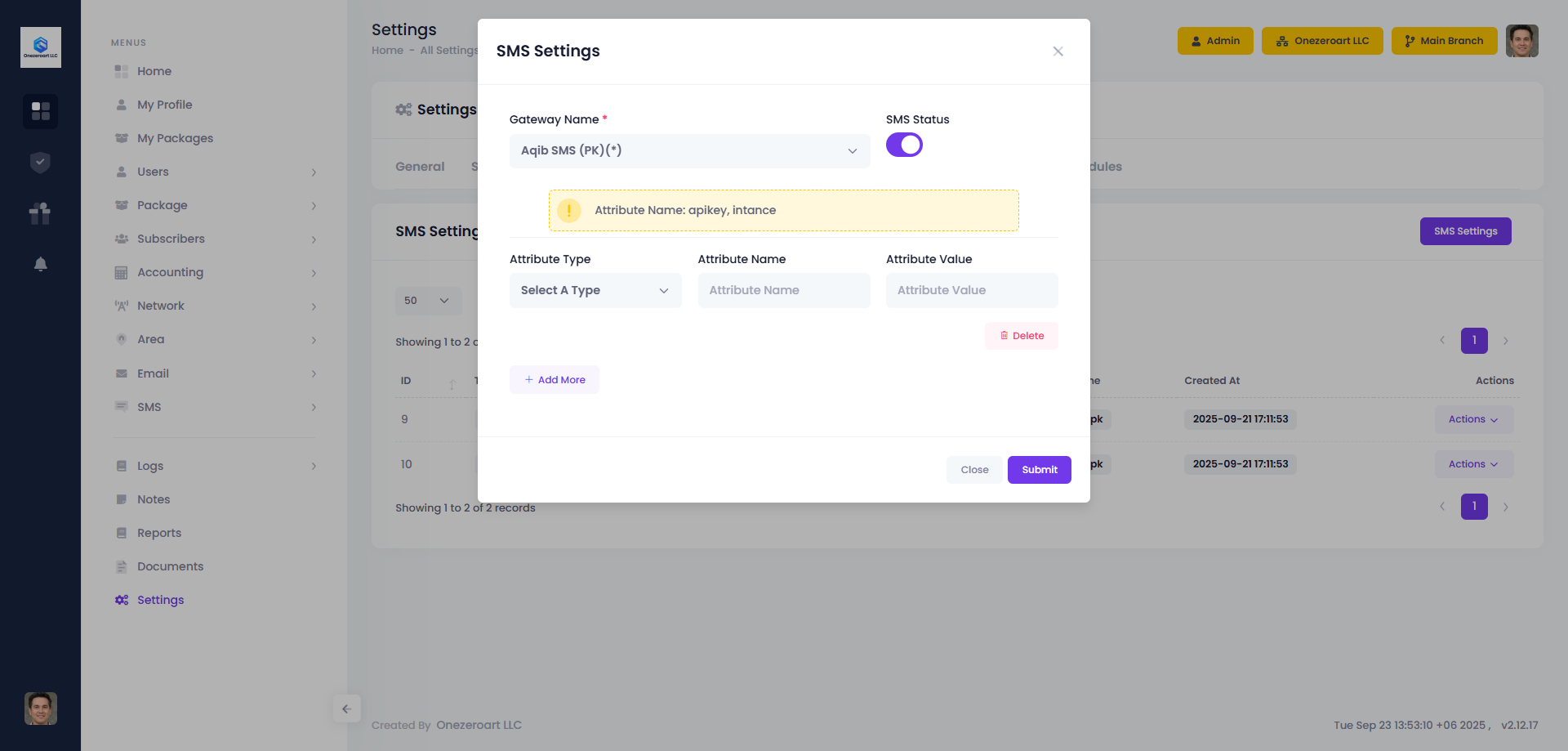
- Aqib SMS (PK) - Requires: apikey, intance
Africa
- Africa's Talking (AF) - Requires: username, apiKey, from
- Kudi SMS (NG - Nigeria) - Requires: token, senderID
- Bongo SMS (TZ - Tanzania) - Requires: apikey, apitoken, type, from
Other Countries
- iSMS (PH - Philippines) - Requires: un, pwd, type
- MSG Owl SMS (MV - Maldives) - Requires: api_key, sender_id
- Wavesnett SMS (IN - India) - Requires: apikey, sender
Custom Integration
- Custom SMS (File Based) - For any other SMS gateway not listed above
- Works with any HTTP-based API
- Requires custom integration file
- Contact support for setup
How to Choose
- Local ISP: Use local gateway (BulkSMSBD, SMS.NET.BD)
- International: Use Twilio or Nexmo
- Custom Gateway: Use Custom SMS API option (if your gateway is not listed)
SMS Status
What It Does: Turns SMS notifications on or off system-wide.
When Enabled (On)
- ✅ SMS sent automatically for configured events
- ✅ Subscribers receive notifications
- ✅ SMS queue processes messages
- ✅ SMS logs are recorded
When Disabled (Off)
- ❌ No SMS sent (even if templates are configured)
- ❌ Subscribers won't receive notifications
- ✅ System continues to work normally
- ✅ Can be re-enabled anytime
Use Cases for Disabling
- Testing without sending real SMS
- Temporarily stop SMS during maintenance
- Reduce SMS costs during off-peak
- Troubleshooting SMS issues
How to Configure SMS Gateway
Step-by-Step Configuration
Step 1: Access SMS Settings
- Login to ZAL ULTRA admin panel
- Go to Settings (gear icon in sidebar)
- Click on SMS Settings tab
- Click Edit button
Step 2: Select Your Gateway
- Find Gateway Name dropdown
- Select your SMS provider from the list
- System will show required credentials below
Step 3: Enter Credentials
- Fill in the required fields (shown automatically)
- Get these credentials from your SMS provider
- Double-check for typos
Step 4: Enable SMS
- Toggle SMS Status to ON
- This activates SMS sending
Step 5: Save Settings
- Click Submit button
- Settings are saved
Step 6: Test SMS
- Click Test SMS button
- Enter your phone number
- Click Send Test SMS
- Check if SMS received
Gateway Configuration Fields
Different gateways require different information. Here's what you need for each:
Bangladesh Gateways
Bulk SMS (BD)
- api_key - Your Bulk SMS API key
- senderid - Your approved sender ID/name
Reve SMS (BD)
- apiKey - Your Reve SMS API key
- secretKey - Your secret key
- callerID - Your approved caller ID
24 Bulk SMS (BD)
- api_key - Your 24 Bulk SMS API key
- customer_id - Your customer ID
iSMS Plus (BD)
- api_token - Your API token
- sid - Your sender ID
Novocom SMS (BD)
- ApiKey - Your API key (case-sensitive)
- ClientId - Your client ID
- SenderId - Your sender ID
Pakistan Gateways
Life Time SMS (PK)
- api_token - Your API token
- api_secret - Your API secret
- from - Your sender number/name
Sendpk (PK)
- username - Your Sendpk username
- password - Your Sendpk password
- sender - Your sender name
Whatsapp SUS (PK)
- api_key - Your API key
- sender - Your WhatsApp sender number
- footer - Footer text for messages
CSMS (PK)
- msisdn - Your mobile number
- password - Your password
- mask - Your sender mask/name
Msg Whatsapp (PK)
- api_key - Your API key
Aqib SMS (PK)
- apikey - Your API key
- intance - Your instance ID
African Gateways
Africa's Talking
- username - Your Africa's Talking username
- apiKey - Your API key
- from - Your sender ID
Kudi SMS (Nigeria)
- token - Your Kudi SMS token
- senderID - Your sender ID
Bongo SMS (Tanzania)
- apikey - Your API key
- apitoken - Your API token
- type - Message type
- from - Your sender ID
Other Countries
iSMS (Philippines)
- un - Your username
- pwd - Your password
- type - Message type
MSG Owl SMS (Maldives)
- api_key - Your API key
- sender_id - Your sender ID
Wavesnett SMS (India)
- apikey - Your API key
- sender - Your sender ID
Where to Get Credentials
For All Gateways:
- Create Account - Sign up with your chosen SMS provider
- Verify Account - Complete verification process
- Get API Credentials - Find in dashboard/settings
- Register Sender ID - Apply for sender name approval (if required)
- Add Balance - Top up your SMS account
Common Locations for Credentials:
- Dashboard → API Settings
- Dashboard → Developer Tools
- Dashboard → Integration
- Settings → API Keys
- Account → Credentials
Sender ID Approval:
- Some countries require sender ID approval
- Submit application with business documents
- Approval takes 1-7 business days
- Use approved sender ID in settings
Important Notes
CREDENTIAL SECURITY
- Never share your API credentials
- Keep credentials secure
- Change passwords regularly
- Use strong passwords
- Enable two-factor authentication (if available)
SENDER ID REQUIREMENTS
Different countries have different sender ID rules:
- Bangladesh: Requires approval from BTRC
- Pakistan: Requires approval from PTA
- India: Requires DLT registration
- Nigeria: Requires approval from NCC
- Other countries: Check local regulations
COMMON MISTAKES
- ❌ Using wrong API key (test vs production)
- ❌ Typos in credentials
- ❌ Using unapproved sender ID
- ❌ Insufficient gateway balance
- ❌ Wrong phone number format
Supported SMS Gateways
ZAL ULTRA supports 18+ SMS gateways from around the world. All gateways are pre-integrated - just enter your credentials and start sending!
Bangladesh Gateways (5 Options)
1. Bulk SMS (BD)
- Popular SMS provider in Bangladesh
- Requires: API Key, Sender ID
- Best For: General SMS needs
- Setup Time: 5 minutes
2. Reve SMS (BD)
- Enterprise-grade SMS gateway
- Requires: API Key, Secret Key, Caller ID
- Best For: Large volume SMS
- Setup Time: 5 minutes
3. 24 Bulk SMS (BD)
- 24/7 SMS service
- Requires: API Key, Customer ID
- Best For: Round-the-clock operations
- Setup Time: 5 minutes
4. iSMS Plus (BD)
- Advanced SMS features
- Requires: API Token, SID
- Best For: Feature-rich SMS
- Setup Time: 5 minutes
5. Novocom SMS (BD)
- Reliable SMS delivery
- Requires: API Key, Client ID, Sender ID
- Best For: Business SMS
- Setup Time: 5 minutes
Pakistan Gateways (6 Options)
1. Life Time SMS (PK)
- Lifetime SMS service
- Requires: API Token, API Secret, From Number
- Best For: Long-term contracts
- Setup Time: 5 minutes
2. Sendpk (PK)
- Popular Pakistani SMS gateway
- Requires: Username, Password, Sender
- Best For: General SMS
- Setup Time: 5 minutes
3. Whatsapp SUS (PK)
- WhatsApp integration
- Requires: API Key, Sender, Footer
- Best For: WhatsApp messaging
- Setup Time: 10 minutes
4. CSMS (PK)
- Corporate SMS service
- Requires: MSISDN, Password, Mask
- Best For: Corporate clients
- Setup Time: 5 minutes
5. Msg Whatsapp (PK)
- WhatsApp messaging service
- Requires: API Key
- Best For: WhatsApp notifications
- Setup Time: 5 minutes
6. Aqib SMS (PK)
- Reliable SMS provider
- Requires: API Key, Instance
- Best For: General SMS
- Setup Time: 5 minutes
African Gateways (3 Options)
1. Africa's Talking (Multi-country)
- Coverage: Kenya, Uganda, Tanzania, Rwanda, Nigeria, etc.
- Requires: Username, API Key, From Number
- Best For: Pan-African operations
- Setup Time: 10 minutes
- Website: africastalking.com
2. Kudi SMS (Nigeria)
- Nigeria-specific SMS gateway
- Requires: Token, Sender ID
- Best For: Nigerian ISPs
- Setup Time: 5 minutes
- Special Feature: Local language support
3. Bongo SMS (Tanzania)
- Tanzania SMS provider
- Requires: API Key, API Token, Type, From
- Best For: Tanzanian ISPs
- Setup Time: 5 minutes
Other Countries (3 Options)
1. iSMS (Philippines)
- Philippines SMS gateway
- Requires: Username (un), Password (pwd), Type
- Best For: Filipino ISPs
- Setup Time: 5 minutes
2. MSG Owl SMS (Maldives)
- Maldives SMS provider
- Requires: API Key, Sender ID
- Best For: Maldivian ISPs
- Setup Time: 5 minutes
3. Wavesnett SMS (India)
- Indian SMS gateway
- Requires: API Key, Sender
- Best For: Indian ISPs
- Setup Time: 5 minutes
Custom Gateway (Unlimited Options)
Custom SMS (File Based)
- Any HTTP-based SMS API worldwide
- Works with GET or POST requests
- Supports JSON, XML, or plain text responses
- Requires: Custom integration file (provided by support)
- Setup Time: 1-2 business days
- Cost: FREE integration service
Popular Custom Gateways:
- BD Smart Pay (Bangladesh)
- OnCloud API (Bangladesh)
- Alpha SMS (Bangladesh)
- Twilio (Global)
- Nexmo/Vonage (Global)
- MSG91 (India)
- Fast2SMS (India)
- Termii (Nigeria)
- Any other HTTP-based SMS API
Custom SMS API Integration
If your SMS gateway is not listed in the built-in options, you can integrate any HTTP-based SMS API using the Custom SMS feature.
What is Custom SMS API?
Custom SMS API allows you to integrate any SMS gateway that works with HTTP requests (GET or POST). This gives you complete flexibility to use local or specialized SMS providers.
How Custom SMS Works
Step 1: Contact Your SMS Provider
- Get your SMS gateway's API documentation
- Note the API endpoint URL
- Note required parameters (API key, username, password, etc.)
- Note the request method (GET or POST)
- Note the response format (JSON, XML, or plain text)
Step 2: Contact ZAL ULTRA Support
- Provide your SMS gateway's API documentation
- Our team will create a custom integration file for your gateway
- Integration file will be installed in your system
- No additional cost for custom SMS integration
Step 3: Configure in Settings
- Go to Settings → SMS Settings
- Select Custom SMS API as gateway type
- Enter your API credentials
- Select your custom integration from the dropdown
- Save settings
Supported Request Types
GET Request APIs
- Parameters sent in URL
- Example:
https://api.gateway.com/send?key=XXX&phone=XXX&message=XXX - Common for simple SMS APIs
- Easy to test in browser
POST Request APIs
- Parameters sent in request body
- Supports JSON or form data
- Example:
POST https://api.gateway.com/sendwith JSON body - More secure than GET
- Better for complex parameters
Supported Response Formats
JSON Response
json
{
  "status": "success",
  "message_id": "12345",
  "code": "200"
}
XML Response
xml
<response>
  <status>success</status>
  <message_id>12345</message_id>
</response>
Plain Text Response
SUCCESS: Message sentRequired Information from Your SMS Provider
When contacting your SMS provider, ask for:
API Endpoint URL
- Example:
https://api.yourgateway.com/sms/send
- Example:
Request Method
- GET or POST
Authentication Method
- API Key
- Username & Password
- Bearer Token
- Other
Required Parameters
- Phone number parameter name (e.g.,
to,mobile,phone) - Message parameter name (e.g.,
message,text,msg) - Sender ID parameter name (e.g.,
from,sender,sender_id) - Any other required fields
- Phone number parameter name (e.g.,
Response Format
- JSON, XML, or plain text
- Success indicator (e.g.,
status: "success",code: 200) - Error codes and messages
Example Custom SMS Gateways
Example 1: BD Smart Pay
- API URL:
http://bdsmartpay.com/sms/smsapi.php - Method: GET
- Parameters:
username- Your account usernamepassword- Your account passwordmobile- Recipient phone numbersms_title- Sender IDmessage- SMS text
- Response: Plain text with success/failure message
Example 2: OnCloud API
- API URL:
https://api.oncloudbd.com/smsapi - Method: GET
- Parameters:
api_key- Your API keysenderid- Sender IDnumber- Phone numbermessage- SMS text
- Response: JSON with status code
Example 3: WhatsApp Integration (WhapiService)
- API URL:
https://gate.whapi.cloud/messages/text - Method: POST (JSON)
- Headers: Bearer token authentication
- Parameters:
to- WhatsApp numberbody- Message text
- Response: JSON with message ID
Custom SMS Configuration Fields
When you select Custom SMS API, you'll see these fields:
1. Service Name
- Dropdown list of available custom integrations
- Select the integration created for your gateway
- Example: "BD Smart Pay", "OnCloud API", "Your Gateway Name"
2. API Credentials
- Fields depend on your gateway requirements
- Common fields:
- Username
- Password
- API Key
- API Secret
- Sender ID
- Base URL
3. SMS Log Status
- Enable/disable detailed logging
- Helps with troubleshooting
- Shows API requests and responses
Testing Custom SMS
Before Going Live:
Verify API Credentials
- Double-check username, password, API key
- Ensure sender ID is approved by gateway
- Check API endpoint URL is correct
Send Test SMS
- Go to Settings → SMS Settings
- Click Test SMS button
- Enter your phone number
- Click Send
- Check if SMS received
Check SMS Logs
- Go to Logs → SMS Logs
- View the test SMS entry
- Check delivery status
- Review any error messages
Verify Response
- Success message should appear
- SMS should be received within 1-2 minutes
- Sender ID should display correctly
Troubleshooting Custom SMS
Issue: "Custom SMS Service Not Found"
- Solution: Contact support to install custom integration
- Ensure integration file is uploaded to system
- Check service name spelling
Issue: "Invalid API Credentials"
- Solution: Verify credentials with SMS provider
- Check for extra spaces in fields
- Ensure API key/password is active
Issue: "SMS Not Received"
- Solution: Check SMS logs for error details
- Verify phone number format
- Check gateway account balance
- Contact SMS provider support
Issue: "Response Parsing Error"
- Solution: Contact support with error details
- May need to adjust response parsing logic
- Provide sample API response
Benefits of Custom SMS
Flexibility
- ✅ Use any SMS gateway worldwide
- ✅ Not limited to built-in gateways
- ✅ Switch providers easily
Cost Savings
- ✅ Choose most affordable local provider
- ✅ Negotiate better rates
- ✅ No vendor lock-in
Local Support
- ✅ Use local language support
- ✅ Better delivery rates in your country
- ✅ Faster issue resolution
Specialized Features
- ✅ WhatsApp integration
- ✅ Voice SMS
- ✅ Bulk SMS features
- ✅ Custom sender IDs
Getting Custom SMS Integration
Step-by-Step Process:
Gather Information
- Get API documentation from your SMS provider
- Note all required parameters
- Test API manually (using Postman or browser)
Contact ZAL ULTRA Support
- Email: [email protected]
- Provide: API documentation, sample request/response
- Mention: Your SMS gateway name
Integration Development
- Support team creates custom integration
- Usually completed within 1-2 business days
- Free of charge for ZAL ULTRA customers
Installation
- Integration file installed in your system
- You'll receive configuration instructions
- Test SMS sent to verify
Go Live
- Configure credentials in SMS Settings
- Test with real subscribers
- Monitor SMS logs for issues
Custom SMS vs Built-in Gateways
| Feature | Built-in Gateways | Custom SMS |
|---|---|---|
| Setup Time | Instant | 1-2 days |
| Configuration | Simple | Requires API details |
| Support | Built-in | Custom integration |
| Flexibility | Limited options | Any gateway |
| Cost | Varies | Your choice |
| Updates | Automatic | May need updates |
Popular Custom SMS Gateways
Bangladesh:
- BD Smart Pay
- OnCloud API
- Alpha SMS
- Boom Cast
- Elite Buzz
Pakistan:
- Twilio Pakistan
- Jazz Business
- Telenor Bulk SMS
India:
- MSG91
- Fast2SMS
- TextLocal
- ValueFirst
Kenya:
- Africa's Talking
- Safaricom Bulk SMS
Nigeria:
- Termii
- SmartSMSSolutions
Global:
- Any HTTP-based SMS API
- WhatsApp Business API
- Telegram Bot API
Important Notes
IMPORTANT
- Custom SMS integration requires API documentation from your provider
- Integration is created by ZAL ULTRA support team
- No programming knowledge required from your side
- Free service for ZAL ULTRA customers
RECOMMENDATION
- Test custom SMS thoroughly before going live
- Keep API credentials secure
- Monitor SMS logs regularly
- Maintain good balance with SMS provider
SMS Templates
SMS templates define what messages are sent for different events. You can customize each template.
Available Templates
1. Activation SMS
- When Sent: When subscriber package is activated
- Default Message: "Dear {name}, your package {package} has been activated. Valid until {expiry}. Thank you!"
2. Expiration Reminder
- When Sent: Before package expires (configurable days)
- Default Message: "Dear {name}, your package will expire on {expiry}. Please renew to continue service."
3. Expired SMS
- When Sent: When package expires
- Default Message: "Dear {name}, your package has expired. Please contact us to renew."
4. Payment Received
- When Sent: When payment is received
- Default Message: "Dear {name}, we received your payment of {amount}. Thank you!"
5. Low Balance Alert
- When Sent: When subscriber balance is low
- Default Message: "Dear {name}, your balance is low ({balance}). Please recharge soon."
6. Invoice Generated
- When Sent: When new invoice is created
- Default Message: "Dear {name}, new invoice #{invoice} for {amount} has been generated."
7. Custom SMS
- When Sent: Manual SMS from admin
- Message: Custom text entered by admin
Template Variables
You can use these variables in your SMS templates:
{name}- Subscriber's full name{username}- Subscriber's username{phone}- Subscriber's phone number{package}- Package name{expiry}- Expiration date{amount}- Payment/invoice amount{balance}- Current balance{invoice}- Invoice number{company}- Your company name
Customizing Templates
- Go to Settings → SMS Settings
- Click on SMS Templates tab
- Select template to edit
- Modify message text
- Use variables from the list above
- Click Save
Tips for Good SMS Templates:
- ✅ Keep messages under 160 characters (1 SMS)
- ✅ Use clear, simple language
- ✅ Include company name
- ✅ Add call-to-action (e.g., "Call us at...")
- ✅ Test before going live
SMS Notifications
Automatic SMS Events
The system can automatically send SMS for these events:
Subscriber Events:
- ✅ Package Activation
- ✅ Package Expiration (before expiry)
- ✅ Package Expired
- ✅ Package Renewal
- ✅ Account Suspended
- ✅ Account Reactivated
Payment Events:
- ✅ Payment Received
- ✅ Invoice Generated
- ✅ Payment Due Reminder
- ✅ Balance Low Alert
Service Events:
- ✅ Service Interruption
- ✅ Maintenance Notification
- ✅ Speed Change Notification
Configuring Notifications
For each event, you can configure:
1. Enable/Disable
- Turn notification on or off
2. Timing
- When to send (immediate, scheduled, before expiry)
- Example: Send expiration reminder 3 days before expiry
3. Recipients
- Who receives the SMS (subscriber, admin, both)
4. Template
- Which SMS template to use
SMS Queue System
How It Works:
- Event occurs (e.g., package activation)
- SMS added to queue
- Queue processes SMS in background
- SMS sent via gateway
- Delivery status logged
Benefits:
- ✅ No delays in system operations
- ✅ Handles high volume
- ✅ Automatic retry on failure
- ✅ Delivery tracking
Testing SMS
Before Going Live
1. Test SMS Gateway Connection
- Go to Settings → SMS Settings
- Click Test SMS button
- Enter test phone number
- Click Send Test SMS
- Check if SMS received
2. Test SMS Templates
- Send test SMS for each template
- Verify message format
- Check variable replacement
- Verify sender ID
3. Test Automatic Notifications
- Create test subscriber
- Activate package
- Check if activation SMS received
- Wait for expiration reminder
- Verify all SMS received
Monitoring SMS
View SMS Logs:
- Go to Logs → SMS Logs
- View all sent SMS
- Check delivery status
- Filter by date, subscriber, status
SMS Log Information:
- Recipient phone number
- Message content
- Sent date/time
- Delivery status (Sent, Failed, Pending)
- Gateway response
- Error messages (if failed)
Troubleshooting
SMS Not Sending
Check These Settings:
- ✅ SMS Status is Enabled
- ✅ Gateway credentials are correct
- ✅ Gateway has sufficient balance
- ✅ Phone numbers are in correct format
- ✅ SMS template is configured
- ✅ Notification is enabled for the event
Common Issues:
Issue: "SMS Gateway Error"
- Solution: Check gateway credentials
- Verify API key/username/password
- Check gateway account balance
- Contact gateway support
Issue: "Invalid Phone Number"
- Solution: Check phone format in Software Settings
- Ensure phone numbers match format
- Remove spaces or special characters
Issue: "SMS Sent but Not Received"
- Solution: Check subscriber's phone number
- Verify phone is active
- Check SMS logs for delivery status
- Contact gateway support
Issue: "Sender ID Not Showing"
- Solution: Register sender ID with gateway
- Some gateways require approval
- Use approved sender ID only
SMS Delivery Issues
Delayed Delivery:
- Check gateway status
- High volume may cause delays
- Peak hours may be slower
- Contact gateway support
Failed Delivery:
- Phone number may be invalid
- Subscriber phone may be off
- Network issues
- Check SMS logs for error details
Partial Delivery:
- Message may be too long (>160 chars)
- Split into multiple SMS
- Reduce message length
Best Practices
Cost Optimization
1. Use SMS Wisely
- ✅ Send only important notifications
- ✅ Avoid duplicate SMS
- ✅ Combine multiple notifications
- ✅ Use email for detailed info
2. Template Optimization
- ✅ Keep messages under 160 characters (1 SMS)
- ✅ Avoid special characters (may increase cost)
- ✅ Use abbreviations where appropriate
3. Timing
- ✅ Send during business hours
- ✅ Avoid late night SMS
- ✅ Batch non-urgent SMS
Message Quality
1. Clear Communication
- ✅ Use simple language
- ✅ Include company name
- ✅ Add contact information
- ✅ Include call-to-action
2. Professional Tone
- ✅ Be polite and respectful
- ✅ Avoid all caps (looks like shouting)
- ✅ Use proper grammar
- ✅ Proofread templates
3. Compliance
- ✅ Include opt-out option (if required by law)
- ✅ Don't send marketing SMS without consent
- ✅ Respect do-not-disturb hours
- ✅ Follow local SMS regulations
SMS Gateway Comparison
By Country
| Gateway | Country | Setup Time | Credentials Required | Best For |
|---|---|---|---|---|
| Bangladesh Gateways | ||||
| Bulk SMS (BD) | Bangladesh | 5 min | API Key, Sender ID | General SMS |
| Reve SMS (BD) | Bangladesh | 5 min | API Key, Secret Key, Caller ID | Enterprise |
| 24 Bulk SMS (BD) | Bangladesh | 5 min | API Key, Customer ID | 24/7 Operations |
| iSMS Plus (BD) | Bangladesh | 5 min | API Token, SID | Advanced Features |
| Novocom SMS (BD) | Bangladesh | 5 min | API Key, Client ID, Sender ID | Business SMS |
| Pakistan Gateways | ||||
| Life Time SMS (PK) | Pakistan | 5 min | API Token, API Secret, From | Long-term |
| Sendpk (PK) | Pakistan | 5 min | Username, Password, Sender | General SMS |
| Whatsapp SUS (PK) | Pakistan | 10 min | API Key, Sender, Footer | |
| CSMS (PK) | Pakistan | 5 min | MSISDN, Password, Mask | Corporate |
| Msg Whatsapp (PK) | Pakistan | 5 min | API Key | |
| Aqib SMS (PK) | Pakistan | 5 min | API Key, Instance | General SMS |
| African Gateways | ||||
| Africa's Talking | Multi-country | 10 min | Username, API Key, From | Pan-African |
| Kudi SMS | Nigeria | 5 min | Token, Sender ID | Nigerian ISPs |
| Bongo SMS | Tanzania | 5 min | API Key, API Token, Type, From | Tanzanian ISPs |
| Other Countries | ||||
| iSMS | Philippines | 5 min | Username, Password, Type | Filipino ISPs |
| MSG Owl SMS | Maldives | 5 min | API Key, Sender ID | Maldivian ISPs |
| Wavesnett SMS | India | 5 min | API Key, Sender | Indian ISPs |
| Custom | ||||
| Custom SMS | Any Country | 1-2 days | Varies | Any Gateway |
By Features
| Feature | Built-in Gateways | Custom SMS |
|---|---|---|
| Setup Time | 5-10 minutes | 1-2 business days |
| Technical Knowledge | None required | None required |
| Configuration | Enter credentials only | Enter credentials + integration file |
| Support | Pre-tested and verified | Custom integration by support team |
| Cost | Gateway provider charges | Gateway provider charges + FREE integration |
| Flexibility | 18 pre-integrated options | Unlimited options |
| Updates | Automatic | May require updates |
| Reliability | Tested by thousands of users | Depends on gateway |
Getting Started Checklist
Initial Setup
- [ ] Choose SMS gateway
- [ ] Create account with gateway provider
- [ ] Get API credentials
- [ ] Register sender ID (if required)
- [ ] Add balance to gateway account
System Configuration
- [ ] Go to Settings → SMS Settings
- [ ] Select gateway type
- [ ] Enter gateway credentials
- [ ] Enable SMS Status
- [ ] Configure sender ID
Template Setup
- [ ] Review all SMS templates
- [ ] Customize messages
- [ ] Test variable replacement
- [ ] Keep messages under 160 characters
- [ ] Save templates
Testing
- [ ] Send test SMS
- [ ] Verify SMS received
- [ ] Check sender ID display
- [ ] Test all templates
- [ ] Verify automatic notifications
Monitoring
- [ ] Check SMS logs daily
- [ ] Monitor delivery rates
- [ ] Track SMS costs
- [ ] Review failed SMS
- [ ] Optimize templates
Related Documentation
- General Settings - Company information
- Subscriber Settings - Subscriber configuration
- Email Settings - Email notifications
- Software Settings - System configuration
SMS Logs
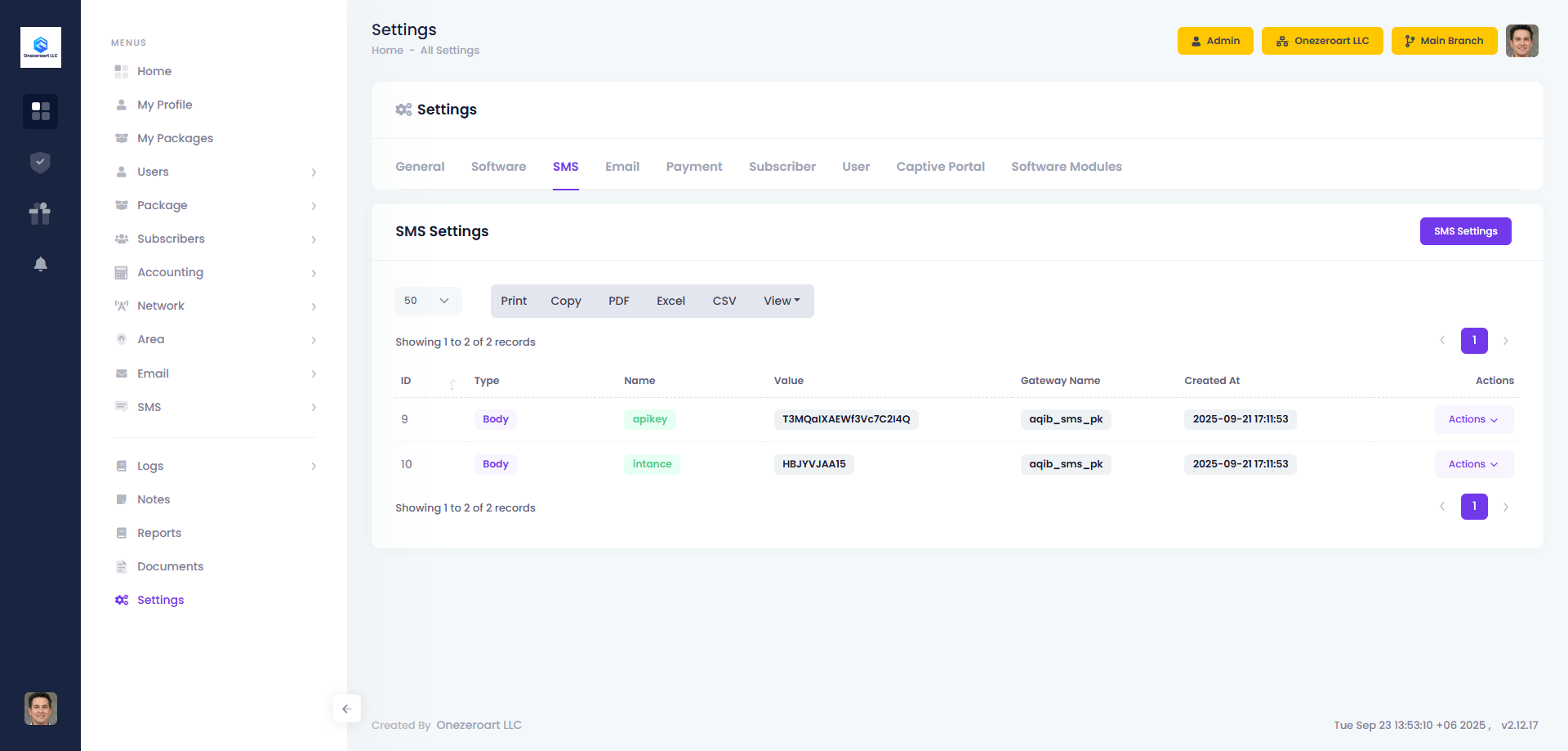
View all sent SMS messages with delivery status, timestamps, and recipient information. Use filters to find specific SMS or track delivery issues.